
An A/A test is an experience that we run without making any changes between variations.
A/A tests can be used for multiple reasons, notably:
- Checking that an experience with specific parameters is running properly.
- Checking the baseline KPIs of a particular user journey.
- Checking that data is properly collected.
- Checking for fluctuations in CR, AOV, PSV, and other important KPIs over time.
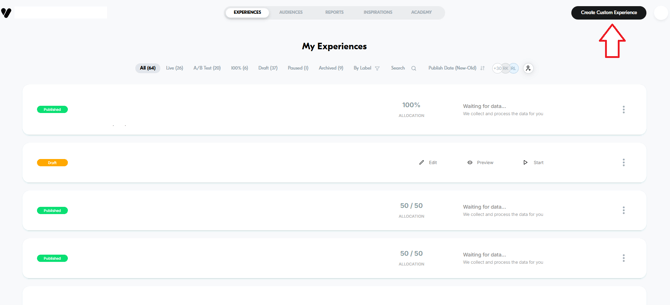
Step 1 - Create a new experience
Step 2 - Set the scope
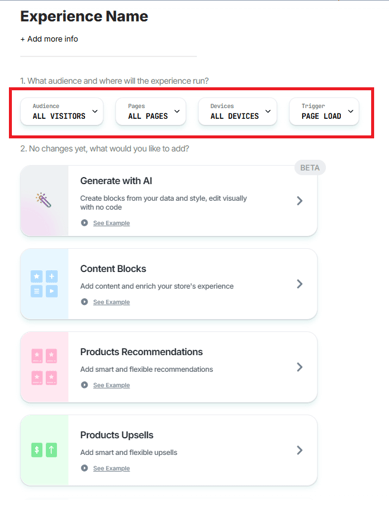
Setting the scope can help you filter out the information that's invaluable to your test. Do you wish to test a particular context? A particular product? A particular campaign?
- Set the scope by defining these 4 parameters:
- Audience - Would you like to test all users? Only users in a particular country? Loyalty members?..
- Pages - Would you like to test all pages? Only sessions that passed through a particular page in the user journey? Only a specific URL?
- Devices - Desktop? Mobile? Both?
- Trigger - You can even define your own triggering logic with JavaScript.
Step 3 - Add an empty JavaScript
Add a blank JavaScript snippet to allow the system to detect an update so the experience can be published.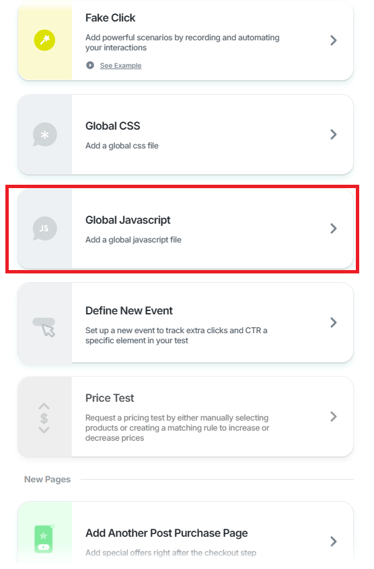
- Scroll to the Global JavaScript section
- Add 0 as a placeholder value
- Save the changes
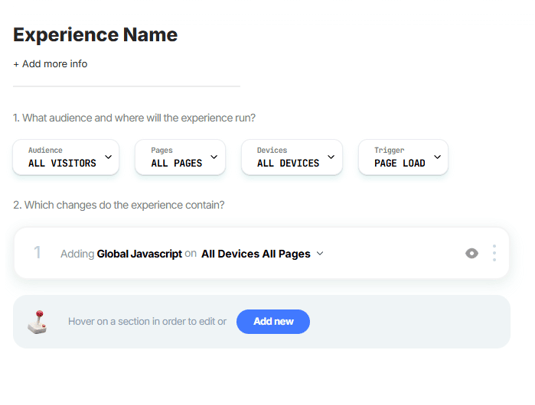
Step 4 - Publish the experience
Once you're done, click on "Next" to finalize your A/A test.
- Give the experience a meaningful name to make it easier to follow up on it.
- Make sure to run an A/B validation and set the primary goal of the A/A test. The Variation section should indicate that there is at least "1 Change".