
You can now access product metafields directly through the Visually SDK using the visually.sdk_api.getProductsMetafields method. This allows you to retrieve metafield values for specific products and use them in your experiences.
Method
visually.sdk_api.getProductsMetafields(
   handles: string[],
   metafields: MetafieldRequest[]
)
Interface
interface MetafieldRequest {
  namespace: string;
  keys: string[];
}
The method returns the requested metafield values for the specified products.
Sync Metafields in Visually
Before you can retrieve a metafield via the SDK, it must be synced in Visually.
-
Open your Visually dashboard.
-
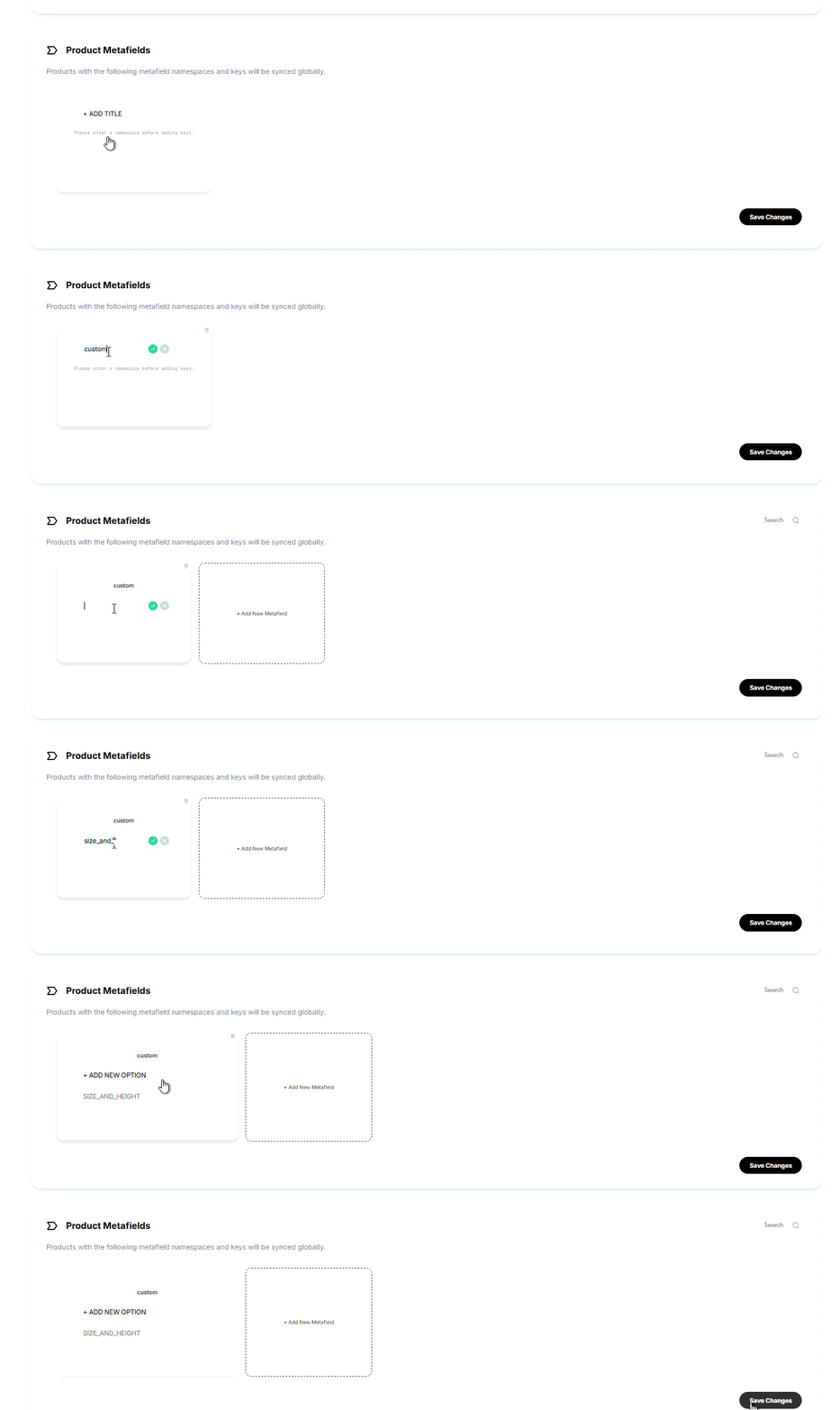
Go to Global Rules → Product Metafields section.
-
Click Add New Metafield.
-
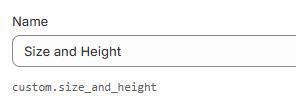
Enter the metafield information exactly as it appears in Shopify:
-
Namespace:
custom -
Key:
size_and_height
-

Once metafields are synced, you can retrieve them using the SDK method.
Example
visually.sdk_api.getProductsMetafields(
  ["medium-soft-ruled-journal-charcoal"],
  [
    {
      namespace: "jasper",
      keys: ["FFSS", "FFSS_Discount"],
    }
  ]
);
Common Use Cases
Product metafields can be used to display additional product information in your experiences, such as:
- Model information
- Size and fit details
- Product badges or labels
- Shipping information
- Custom product attributes stored in Shopify
Once a metafield has been added to Global Rules → Product Metafields and your catalog has been synced, you can retrieve its value using the Visually SDK and use it in custom code.
Using Metafields with Recommendations
Product metafields can be used to enhance the content displayed within recommendation tiles, such as showing additional product information or custom badges.
However, product metafields cannot be used to determine which products are displayed in a Recommendations or Upsells widget. Recommendation widgets will continue to use the products selected by the configured recommendation strategy.
Tips for Avoiding Common Issues
- Always enter the namespace and key separately in Visually.
- Make sure the metafield exists in Shopify and contains a value.
- Sync your catalog after adding new metafields in Visually.
- Only metafields that have been added to Global Rules → Product Metafields and synced with Visually can be retrieved.
- If a metafield value is not returned, verify that the namespace and key match Shopify exactly.