
General Reports Page
1. Revenue Attribution Summary
This is where you can understand how much revenue is attributed to the overall experiences.
-
Revenue through experience
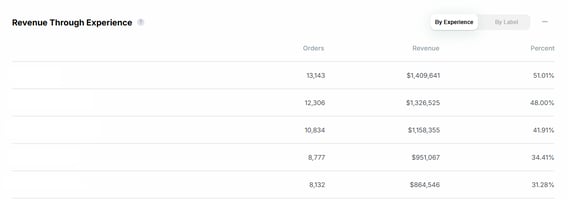
The total revenue of all purchases made after viewing an experience. Purchases are only counted if they occur after a user viewed an experience.
-
Assisted revenue
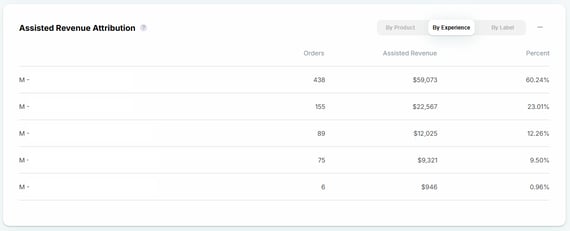
Revenue generated from products bought after clicking on a recommended item and buying any product within the session.
-
Direct revenue
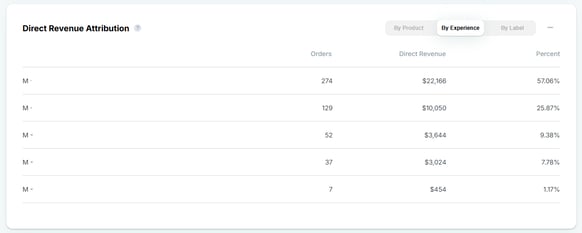
Revenue generated from products bought after clicking on a recommended item and buying that item (or items from its group ID) within a 30-day window.
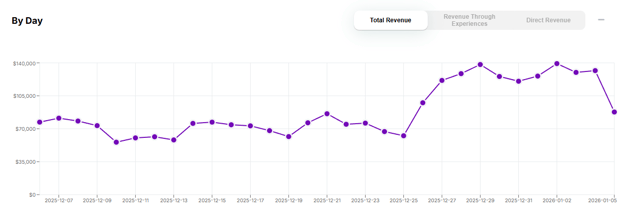
2. Trendline
In this section, you can observe the trend line of your attributed revenue over time.
3. Table
In this section, you can observe how much assisted revenue and orders each one of your experiences brought.
-jpg.jpeg?width=670&height=190&name=image%20(1)-jpg.jpeg)
- The default time window is "last 30 days", but you can easily adjust that by clicking on the date selector at the top of the page.
Experience Reports Page
This section allows you to compare your published experiences with the control and review key metrics such as AOV and CR for each variant.

You can also see the Direct and Assisted Revenue generated by each variant per experience.
Note: Although Visually listens to Shopify Pixels for events tracking, Visually runs it's own analytics stack that monitors events. This means that some KPI would have it's own definitions i.e. Average Order Value(AOV) being calculated as "Order Total (gross total) divided by the number of transactions.
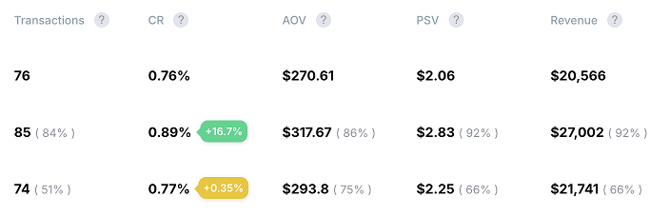
What Do the Grey Percentages Mean?
You may notice greyed-out percentages in parentheses next to key metrics (KPIs).
The grey percentages show the “odds to win” for each variation. This indicates how likely a variation is to be the best performer based on the selected primary goal.
For example:
- A variation showing 92% means it has a 92% probability of being the winning variant for the selected KPI (e.g., PSV).
Why is this useful?
These values help you:
- Understand which variation is most likely to win early in the test
- Evaluate performance confidence beyond raw metric changes
- Make faster, data-informed decisions while a test is running
Important note
The "odds to win" are probabilistic, meaning they update as more data is collected and are not final results until the test reaches statistical significance.
You can read more about the how odds to win are calculated here.
Incorporating Additional KPIs in A/B Test Reports
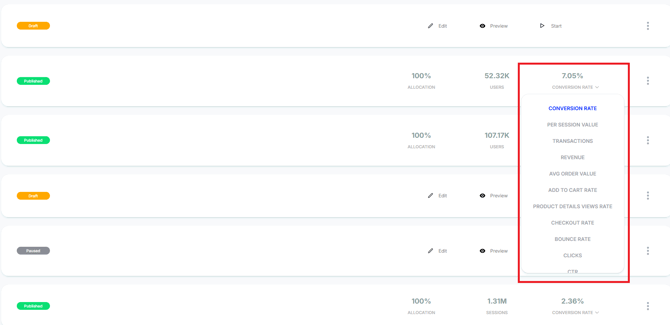
If you have published a test and wish to add additional KPIs to the experience report, you can do so by clicking the desired KPI button located at the bottom of the report page.

The report will only display data after the experience is published.
Additionally, you can also check the list of KPIs in your store's Dashboard.
Data is refreshed ~once per hour.
For further assistance or questions, reach out on the chat support widget or via support@visually.io.