
- How does Visually affect website loading speed?
- How does Visually affect Google Lighthouse scores?
- How does Visually maintain low latency at scale?
- Performance Optimization Techniques
- How accurate is Visually’s tracking system?
- How is Visually improving tracking accuracy?
- Can customers use custom tracking IDs or cookies?
- What technology powers Visually widgets?
- Is it mandatory to use Visually’s built-in widgets?
- How does Visually’s recommendation engine work?
- What is Visually's official SLA?
- What gets installed when I install Visually?
- How does Visually work on the storefront?
- What data does Visually store?
- Consent Management & CMP Integration
- Is Visually SOC 2, GDPR, or CPRA compliant?
- How does Visually affect SEO?
- Which AI models does Visually use?
- How does Visually minimize website flicker?
- How does Visually maintain long-term visitor identity across personalization campaigns?
How does Visually affect website loading speed?
Visually is designed with performance and scalability in mind. The primary asset loaded directly on the website is our lightweight SDK, which is only 16KB in size.
All additional resources are loaded asynchronously and in a non-blocking manner, ensuring they do not interfere with the site’s rendering or user experience. The SDK itself is hosted on Google CDN, providing highly reliable global delivery with extremely fast response times.
Key Performance Metrics
- SDK size: 16KB
- Average SDK round-trip latency: ~22ms
- Resources loaded asynchronously
- Non-blocking architecture
- Google CDN delivery
Our architecture is specifically optimized to minimize impact on Core Web Vitals and overall page responsiveness.
How does Visually affect Google Lighthouse scores?
Visually may introduce a slight impact on Lighthouse performance scores in some environments. Based on both internal monitoring and Shopify ecosystem observations, the impact is typically:
- Average impact: ~1-2%
- Worst-case scenarios: up to ~10%
However, Lighthouse scores do not always represent real-world user performance accurately, especially for highly dynamic ecommerce environments. In practice, Visually is engineered to maintain performance levels competitive with — and often better than — leading experimentation platforms such as Dynamic Yield and Google Optimize.
We continuously optimize our SDK and delivery mechanisms to minimize performance overhead while maximizing experimentation flexibility.
How does Visually maintain low latency at scale?
As the number of active experiences grows, Visually employs multiple optimization strategies to ensure latency remains low and scales linearly.
Performance Optimization Techniques
Smart Experience Targeting
Only experiences matching the visitor’s targeting rules are delivered, minimizing unnecessary payload size.
Intelligent SDK Cache Layer
The SDK caches previously fetched experiences and only requests incremental changes, reducing repeated data transfer.
Dynamic Client-Server Architecture
Instead of generating a large monolithic JS/CSS bundle, experiences are dynamically served and injected as needed.
DNS Prefetching
We minimize DNS resolution latency using prefetching techniques to accelerate network initialization.
Dynamic Widget Injection
Widgets are injected into the page only when required, reducing unnecessary rendering and execution overhead.
These optimizations allow Visually to deliver highly personalized experiences while maintaining fast and responsive website performance.
How accurate is Visually’s tracking system?
Achieving perfect attribution and tracking accuracy across all browsers and environments is inherently challenging due to factors such as browser restrictions, cookie policies, ad blockers, and cross-device behavior.
When sampling website performance and user behavior Visually typically achieves an effective accuracy rate of approximately:
- 75%-95% effective accuracy
This accuracy level reflects real-world ecommerce environments and aligns with the limitations faced by modern analytics and experimentation platforms.
How is Visually improving tracking accuracy?
Visually is actively developing an AI-powered identity resolution system designed to improve session stitching and cross-session attribution (for consent users).
The solution leverages:
- Behavioral event analysis
- Client-specific fingerprinting signals
- Session correlation models
- AI-driven user matching
This approach enables more accurate reconstruction of user journeys across sessions and devices, resulting in improved personalization and reporting accuracy.
Can customers use custom tracking IDs or cookies?
Yes. Visually fully supports custom tracking implementations.
Customers can integrate:
- Custom cookies
- User IDs
- External tracking identifiers
- CRM/customer identifiers
- Proprietary attribution systems
Our engineering team can assist with implementing custom tracking logic to ensure compatibility with existing analytics and data infrastructures.
What technology powers Visually widgets?
Visually widgets are built using Preact, a lightweight alternative to React.
Why Preact?
- Extremely small footprint (~3KB)
- Fast rendering performance
- React-compatible architecture
- Minimal impact on website performance
Each widget operates as an independent component dynamically injected by the Visually SDK.
This modular architecture enables:
- Faster execution
- Improved maintainability
- Independent rendering
- Flexible deployment
Is it mandatory to use Visually’s built-in widgets?
No. While Visually provides a large and continuously growing library of production-tested widgets, customers are not limited to using only prebuilt components.
Available Options
Native Visually Widgets
Ready-to-use widgets optimized for performance and conversion.
Manual or AI Generated Code Blocks
A native feature allowing customers to inject custom:
- HTML
- CSS
- JavaScript
This enables teams to rapidly prototype and validate ideas before permanently implementing them into their codebase.
Feature Flagging & Native Testing
Visually can also be used to:
- Activate feature flags
- Test native website changes
- Run experiments on existing frontend functionality
- Run Shopify theme/template based testing
This provides maximum flexibility for both marketing and engineering teams.
How does Visually’s recommendation engine work?
Visually’s recommendation engine combines multiple machine learning and rule-based approaches to generate highly relevant product recommendations.
Depending on the strategy, the platform may use one or several algorithms simultaneously.
Recommendation Algorithms
Content-Based Filtering
Recommends products based on product attributes, metadata, and similarities to user preferences.
Association Rules
Identifies products frequently viewed or purchased together using historical behavioral patterns.
Collaborative Filtering
Uses similarities between users and products to generate personalized recommendations.
Includes:
- User-based collaborative filtering
- Item-based collaborative filtering
Deep Learning
Neural network models trained on user interactions and behavioral signals to uncover complex recommendation patterns.
|
Algo / Strategy |
Content Based |
Association Rules |
Collaborative Filtering |
Deep Learning |
Custom Logic |
|
Manual |
✓ |
||||
|
Most Popular |
✓ |
||||
|
New Arrivals |
✓ |
||||
|
Cart Items |
✓ |
||||
|
Recently Viewed |
✓ |
||||
|
Purchased Items |
✓ |
||||
|
Viewed Together |
✓ |
✓ |
|||
|
Purchased Together |
✓ |
✓ |
✓ |
||
|
Personalized |
✓ |
✓ |
✓ |
||
|
Advanced Rules |
✓ |
✓ |
|||
|
Viewed with Recently Viewed |
✓ |
✓ |
|||
|
Purchased with Recently Purchased |
✓ |
✓ |
What is your official SLA?
Uptime/Availability: 99.5% Yearly Uptime
Response Time:
- Critical issues: Typically within 1 hour.
- High-priority issues: Typically within 4 hours.
- Medium-priority issues: Typically within 8-24 hours.
- Low-priority issues: Typically within 48 hours.
Resolution Time:
- Critical issues: Typically within 24 hours.
- High-priority issues: Typically within 48 hours.
- Medium-priority issues: Typically within 3-5 business days.
- Low-priority issues: Typically within 10 business days.
Maintenance and Updates:
- Scheduled maintenance: Typically outside of peak hours with prior notice.
- Emergency maintenance: Typically communicated as soon as possible.
Our status page can is updated in real time and can be accessed from: https://status.visually.io/
What gets installed when I install Visually?
Visually is installed directly from the Shopify App Store and integrates with the storefront using Shopify’s recommended Online Store 2.0 architecture.
During installation, Visually injects a lightweight snippet called: visually_io_sdk.liquid into the store’s snippets and referencing that script from the theme.liquid file, immediately after the <head> tag.
This integration enables Visually to dynamically load and manage experiences across the storefront without requiring manual deployment work from the merchant.
It’s worth noting that when uninstalling Visually you’ll need to manually remove these lines or just follow our official help center article: https://help.visually.io/how-to-manually-remove-visually-code
How does Visually work on the storefront?
Fetching Experiences & Targeting Rules
Once the Visually runtime loads, it securely communicates with Visually’s backend to determine which experiences should be applied for the current visitor and page.
These experiences can include:
- Visual Editor changes
- A/B test variants
- Personalization campaigns
- Product recommendation widgets
- Feature flags
- Audience targeting rules
The decision engine evaluates multiple factors in real time, such as:
- Current URL/page
- Device type
- Visitor behavior
- Audience segments
- Experiment allocations
- Customer attributes
Only the experiences relevant to that specific visitor are returned and applied, helping minimize unnecessary data transfer and maintain fast performance.
Non-Destructive Client-Side Modifications
Visually applies changes directly within the browser using lightweight DOM and CSS manipulations.
This allows teams to modify the storefront experience without permanently changing the Shopify theme codebase.
Supported Modifications Include
- Updating text and images
- Changing styles and layouts
- Reordering or moving elements
- Showing or hiding sections
- Injecting UI components such as:
- Banners
- Popups/modals
- Badges
- Recommendation widgets
- Promotional elements
Because all modifications are applied dynamically at runtime:
- Original theme files remain untouched
- No permanent code changes are made
- Disabling Visually immediately restores the original storefront experience
This “non-destructive” architecture significantly reduces deployment risk and allows teams to experiment safely without affecting core storefront stability.
Routing & Dynamic Navigation Support
Modern Shopify themes increasingly use dynamic page navigation and partial page rendering instead of full page reloads.
Visually’s runtime automatically detects:
- Route changes
- AJAX navigation events
- Dynamic content updates
When navigation occurs, the runtime intelligently re-evaluates and reapplies the relevant experiences for the new page state.
This ensures experiences remain consistent and functional across:
- Collection pages
- Product pages
- Search/navigation flows
- Single-page-app-like storefront behaviors
What data does Visually store?
Visually only stores the data required to power experimentation, personalization, analytics, and recommendations.
Data We Store
- Catalog Data
Collected via the Shopify API, including:
- Products and variants
- Meta-fields
- Inventory availability
- Images
- Pricing
- Collections and related catalog metadata
- Anonymized Order Data
Collected via the Shopify API, including:
- Order totals
- Taxes
- Shipping amounts
- Purchased items
- Discount codes
No personally identifiable customer information is stored.
- Visual Analysis Data
Collected by Visually’s automated analysis agents, including:
- Website styling and structure
- UI components and features
- Cart implementation type
- Theme behavior and storefront capabilities
This data helps optimize compatibility and personalization capabilities.
- Anonymized Visitor Data
Collected through Visually’s tracking infrastructure, including:
- Page views
- Behavioral events
- Session activity
What Visually Does NOT Store
- Personal User Information
Visually does not store:
- Customer names
- Emails
- Phone numbers
- Addresses
- Payment information
- Any personally identifiable information (PII)
- IP Addresses
Visually does not retain visitor IP addresses.
Consent Management & CMP Integration
Visually integrates with Shopify’s official Customer Privacy & Consent APIs and respects the merchant’s configured consent management platform (CMP) settings.
Supported Consent Modes
1. Opt-In Consent (GDPR / EU)
Used primarily for GDPR-compliant regions such as the European Union.
In this mode:
- Visually does not initialize tracking
- No experiences are loaded
- No storefront modifications are applied
- No visitor data is collected
until the visitor has explicitly opted in to tracking and personalization cookies.
This means Visually remains completely inactive until consent is granted.
2. Opt-Out Consent (California / CPRA)
Used primarily for California privacy regulations.
In this mode:
- Visually loads by default
- Visitors may opt out of tracking or personalization
- Consent preferences are continuously respected and updated
3. No Consent Required
Used in regions where explicit consent is not legally required.
In this mode:
- Visually loads immediately
- Experiences and personalization are applied normally
- Standard anonymous tracking operates automatically
Is Visually SOC 2, GDPR, or CPRA compliant?
Visually is currently in the process of completing formal compliance and audit programs for:
- SOC 2
- GDPR
Our infrastructure and platform architecture are being aligned with industry-standard security, privacy, and operational best practices as part of these initiatives.
Current Privacy & Security Practices
Even while formal audits are in progress, Visually already implements multiple privacy and security-focused practices, including:
- Anonymous visitor tracking
- No storage of personally identifiable information (PII)
- No retention of IP addresses
- Encryption in-transit and in-rest
- HTTPS-secured communication
- Shopify-native consent integration
- Configurable consent management modes
- Minimal and non-destructive storefront integration
How does Visually affect SEO?
Visually is designed to minimize SEO impact and preserve the store’s native Shopify SEO structure.
Additionally, most known search engine crawlers and SEO agents are intentionally excluded from Visually experiences and tracking logic. In many cases:
- Visually does not initialize for recognized bots
- Personalized experiences are not rendered for crawlers
- SEO agents typically index the original storefront content rather than Visually modifications
This helps ensure:
- Stable SEO indexing
- Consistent crawl behavior
- Reduced risk of SEO inconsistencies caused by dynamic personalization or experimentation
Combined with our lightweight, non-destructive client-side architecture, this allows merchants to safely run personalization and experimentation initiatives without significantly affecting organic search visibility.
Do you use customer data to train AI models?
No.
Visually does not use merchant or visitor data to train public or shared AI models.
Customer data remains isolated to the merchant’s own environment and is only used to power the specific features and experiences enabled for that merchant, such as:
- Personalization
- Recommendations
- Experimentation
- Analytics
We do not use customer data to improve or train foundation models for other customers or third parties
Which AI models does Visually use?
Visually currently utilizes the Google Gemini family of models for selected AI-powered capabilities and internal processing workflows.
The exact model usage may evolve over time as the platform and AI infrastructure continue to develop.
How does Visually minimize website flicker?
Visually is designed to apply experiences as early and efficiently as possible in the page lifecycle, and in most cases users will not notice any visual flicker.
Because experiences are loaded dynamically in the browser, small visual transitions can occasionally occur when modifying elements that are immediately visible above the fold during initial page render.
When can flicker occur?
Flicker is most likely to occur when:
- Editing above-the-fold content
- Replacing large hero sections
- Reordering visible layout elements
- Applying major styling changes immediately after page load
This is a common challenge across all client-side experimentation and personalization platforms.
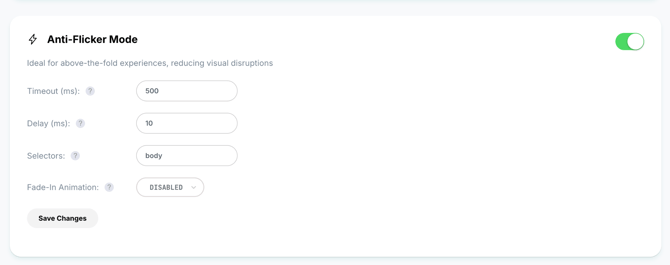
Visually Anti-Flicker Protection
To minimize this effect, Visually provides an optional anti-flicker feature that can be enabled:
- For specific elements
- For individual experiences
- Or for the entire page
The anti-flicker mechanism temporarily hides targeted content until the relevant experience is fully evaluated and rendered, preventing users from briefly seeing the original version before modifications are applied.
This helps create a smoother and more visually stable experience for sensitive or highly visible page areas.
How does Visually maintain long-term visitor identity across personalization campaigns?
Visually maintains long-term personalization consistency using anonymous visitor identifiers and behavioral session history stored within our tracking infrastructure.
Each visitor receives a Visually-generated anonymous ID that allows the platform to:
- Recognize returning visitors
- Persist audience memberships
- Maintain experiment allocations
- Apply consistent personalization across sessions
- Build long-term behavioral profiles and affinities
How is personalization continuity maintained?
As visitors interact with the storefront, Visually continuously updates behavioral signals, these signals are associated with the anonymous visitor profile and used to:
- Reapply relevant experiences
- Maintain segmentation consistency
- Improve recommendation quality over time
- Support lifecycle and retention campaigns
By default, personalization continuity is maintained at the anonymous browser/session level.
For advanced implementations, merchants may optionally provide:
- Internal Customer IDs
- Edge user ids (for example using edgemesh id)
- Loyalty IDs
- Custom hashed identifiers
This allows Visually to associate activity across:
- Multiple sessions
- Logged-in experiences
- Different devices
while still remaining fully merchant-controlled.