
Overview
The Global Control Group lets you exclude a small percentage of users from all experiments and experiences. These users always see the original (non-test) version of your site.
How it works
- A fixed percentage of traffic is randomly assigned to the Global Control Group
- Users in this group are excluded from all current and future tests
- They consistently see the control experience across sessions
How to set up the Global Control Group
- Click your Account Icon
- Open Account Settings
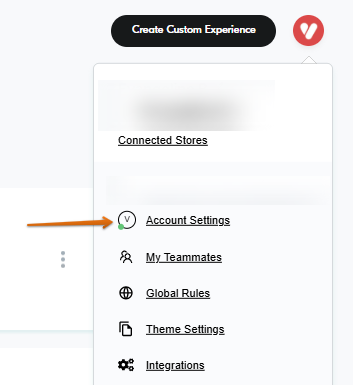
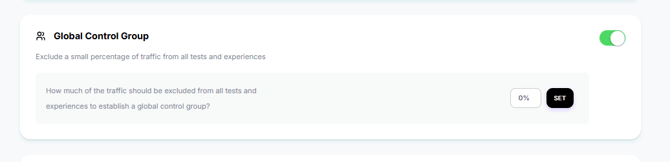
- Find the Global Control Group section
- Toggle it on
- Set the percentage of traffic to exclude from all tests
- Click "Set" to apply changes
Notes
- Applies across all experiments in the account
- Reduces available traffic for testing
Having Trouble?
We’ve got your back.
Email us at support@visually.io or reach out on chat for help with setup or troubleshooting.