
When working in Shopify’s Theme Editor, you may want to prevent a live Visually experience from appearing or applying changes while you edit your theme.
Shopify provides a Shopify.designMode variable that identifies when a storefront is being viewed inside the Theme Editor. It returns true in the Theme Editor and is not set during normal storefront browsing.
Exclude the Shopify Theme Editor
To prevent an experience from loading inside the Theme Editor, add a Custom Trigger to the experience using the following code:
return new Promise(resolve => { if (!window?.Shopify?.designMode) { resolve(); } })
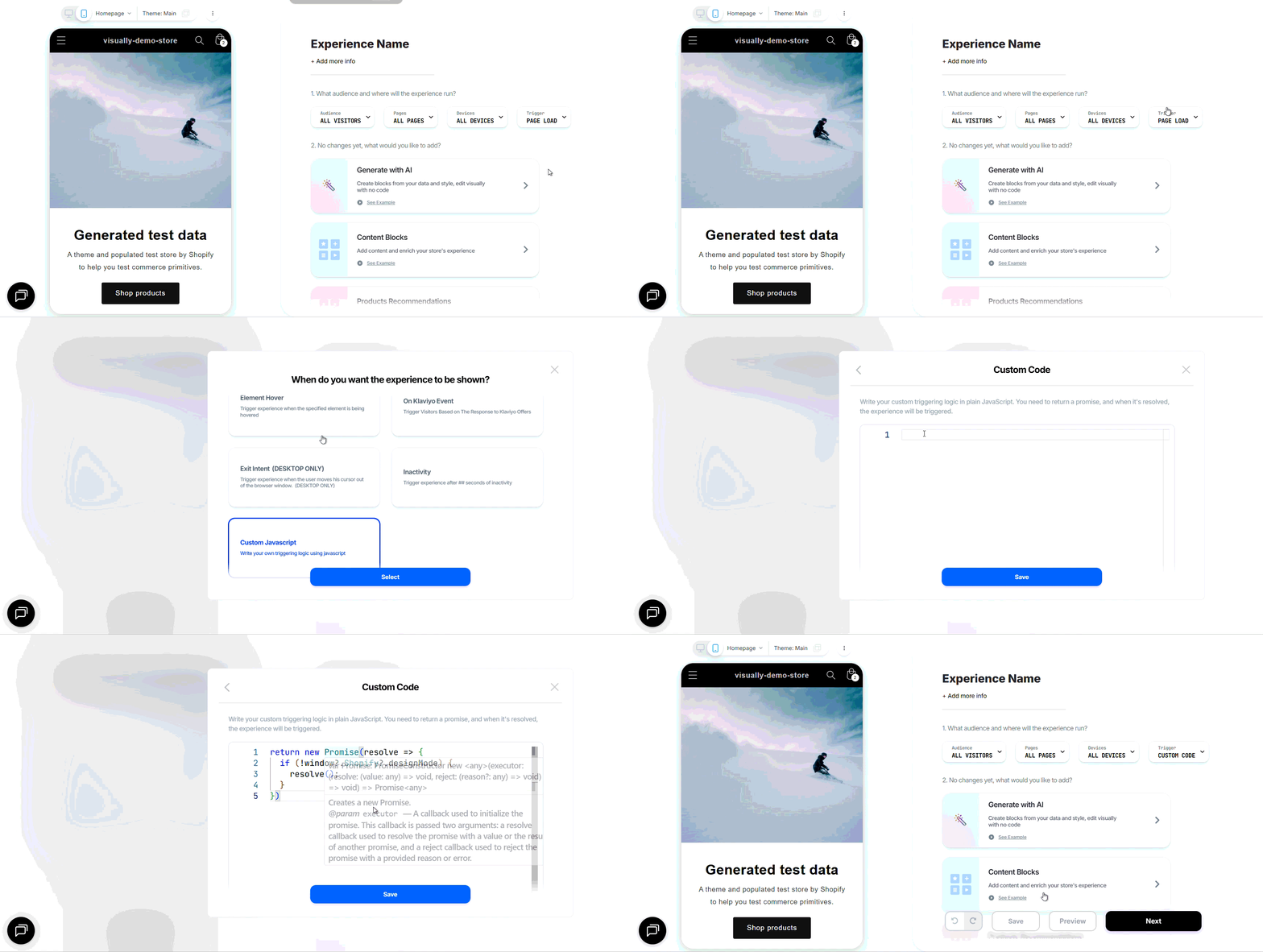
This trigger checks whether the visitor is currently viewing the storefront through Shopify’s Theme Editor.
- Inside the Theme Editor: The trigger does not resolve, so the Visually experience is not activated.
- On the storefront: The trigger resolves normally, allowing the experience to run for eligible visitors.
This can be useful when a live Visually experience interferes with editing or previewing your theme in Shopify.
Having Trouble?
We’ve got your back.
Email us at support@visually.io or reach out on chat for help with setup or troubleshooting.