
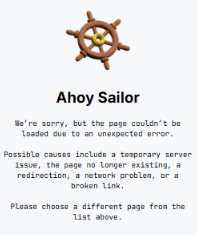
If you see the following message in the Visually editor:
Ahoy Sailor
We're sorry, but the page couldn't be loaded due to an unexpected error.
Possible causes include a temporary server issue, the page no longer existing, a redirection, a network problem, or a broken link.
Please choose a different page from the list above.
it means Visually was unable to load the selected page.
This can happen for several reasons, including broken links, redirects, removed pages, or outdated URLs.
Common Causes
The error may occur when:
- The selected page no longer exists.
- The page URL redirects elsewhere.
- The page URL is incorrect.
- The store has recently changed domains.
- Network or temporary server issues prevent the page from loading.
If You Recently Changed Your Store Domain
If your store has migrated to a new domain, some existing experiences may still contain page URLs that reference the previous domain.
When Visually attempts to load those pages, redirects can prevent the editor from loading successfully and trigger the error.
How to Fix It
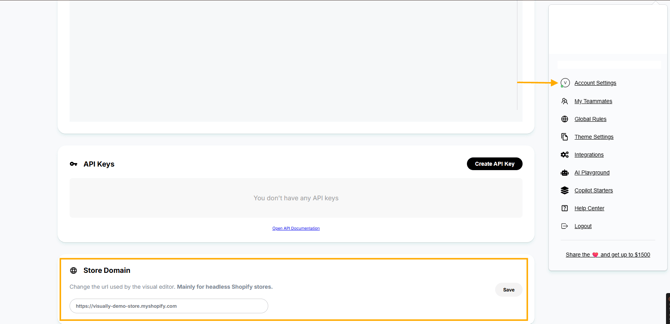
1. Update Your Account Domain
Navigate to Account Settings and confirm your storefront domain is correct.
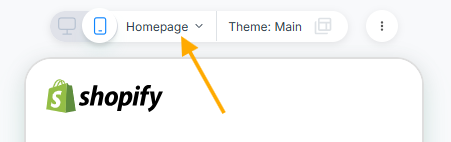
2. Review Existing Experiences
Open the affected experience and verify that all page URLs reference your current domain.
Update any URLs that still point to an old domain.
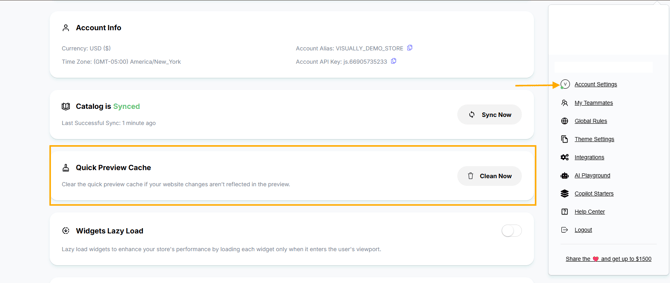
3. Clear Preview Cache
After updating URLs:
- Clear the preview cache.
- Allow a few moments for changes to propagate.
4. Reopen the Experience
Close and reopen the experience in the editor.
Having Trouble?
We’ve got your back.
Email us at support@visually.io or reach out on chat for help with setup or troubleshooting.