
What does Product Analysis measure?
When should I use Product Analysis?
By default, Experience metrics such as Conversion Rate (CVR) and Revenue are measured at the Experience level based on the applicable session, user, or impression-level attribution. This means a visitor can enter an Experience on one product page but ultimately purchase a different product, and that purchase can be included in the Experience's overall results.
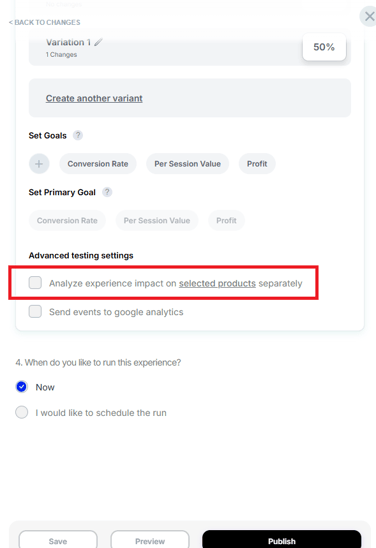
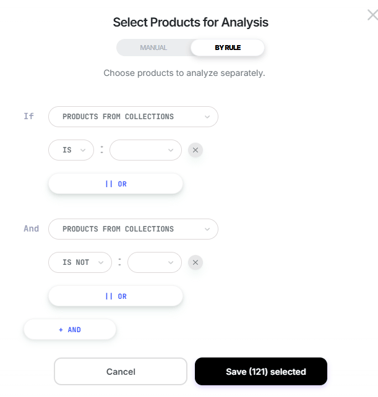
Product Analysis provides an additional, more granular view of the Experience by allowing you to select one or more products and analyze their individual performance.
You can configure Product Analysis in the final stage of your Experience setup:
What does Product Analysis measure?
Product Analysis helps you understand how specific products perform within an Experience, rather than looking only at the Experience's overall results.
Depending on the available data, the Product Analysis report can provide insights into areas such as:
- Product conversion and revenue: Understand how effectively selected products convert and how much revenue they generate.
- Sales performance: Review product-level sales activity, including units sold and transactions.
- Profitability: Analyze metrics such as profit, profit margin, and profit per sale.
- Customer behavior: Review product-level actions such as Add to Cart activity.
This allows you to evaluate the performance of individual products and understand how the Experience may have influenced those products.
When should I use Product Analysis?
Use Product Analysis when you want to understand how an Experience affects the performance of specific products.
It is particularly useful when an Experience involves multiple products and you want to evaluate those products individually instead of relying only on the Experience's overall metrics.
For example, if an Experience promotes or recommends several products, you can select those products in Product Analysis to compare their individual performance.
This can help answer questions such as:
- Which selected product generated the most revenue?
- Which product had the strongest conversion performance?
- How did sales performance differ between selected products?
- Did the Experience have a stronger impact on one product than another?
- How did product profitability compare between variants?
Minimum session requirements
To ensure reliable and meaningful insights, product-level data is only displayed after a minimum amount of traffic has been collected.
General reports (variant-level)
- A minimum of 20 sessions per variant is required before results are displayed.
Product Analysis
- A minimum of 10 sessions per selected product is required before the product appears in the report.
Why isn't my product showing in the report?
If a selected product is missing from the Product Analysis report, it likely hasn't yet reached the minimum session threshold.
- No data shown = the selected product has not yet collected enough sessions.
- Product data will automatically appear once the minimum session requirement is met.
General Analysis reporting helps you understand the overall performance of an Experience, while Product Analysis provides a more granular view of how specific products perform within that Experience.
Use Product Analysis when you want to evaluate individual products across metrics such as conversion, sales, revenue, profitability, and other available product-level performance indicators.
If you need help checking whether a product has reached the required session count, email us at support@visually.io or reach out on chat for help.