
If you're seeing a 403 error or an "Ahoy sailor" message when accessing the Visually Editor, it usually means your store’s security or bot protection system is blocking the Editor’s requests.
This guide explains why this happens and how to resolve it.
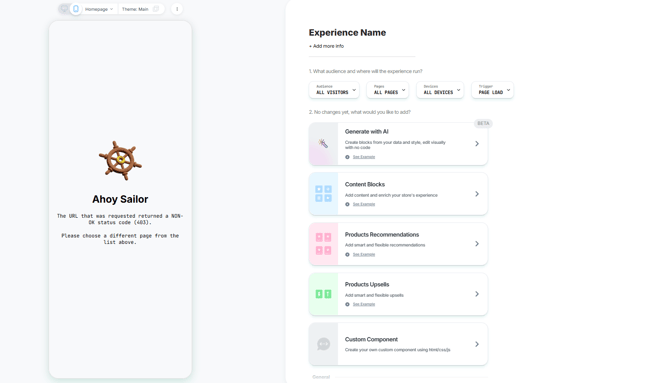
When this issue occurs
A 403 error may appear when:
-
Bot protection tools are active on your store
-
Cloudflare or similar security layers are blocking requests
Even if the issue appears only on a single page, it is still typically caused by a global security rule affecting that route or asset load.
Common causes
The most frequent causes include:
-
Bot protection tools
Examples include:
- Cloudflare Bot Fight Mode / Super Bot Fight Mode
- Nostra
- Edgemesh
- Other WAF (Web Application Firewall) configurations
-
Security rules not recognizing the Editor
The Visually Editor uses verified requests and HTTP Message Signatures, but some security setups do not automatically recognize these and may treat them as automated traffic.
How to fix it
Third-party bot protection tools (e.g. Nostra, Edgemesh, etc.)
If you're using external bot protection tools (such as Nostra, Edgemesh, or similar), allow traffic to the Visually Editor by:
-
Allowlisting the following user-agent:
Visually-Editor(includes) - Ensuring requests are not challenged or blocked as automated traffic
In some setups, you may also need to ensure the following domains are not blocked:
- visually.io
- loomi.me
- vsly.local
- loomi-prod.xyz
Cloudflare users (additional step)
If you're using Cloudflare, allow the Visually Editor in your WAF rules:
Go to Security → WAF → Custom Rules and add:
Option 1: Skip by User-Agent (Simplest)(http.user_agent contains "Visually-Editor"
-
- Action: Skip → All Cloudflare features (or Bot Fight Mode)
- Place rule at the top priority
Option 2: Skip by Signature Header (More secure):(http.headers.names contains "signature-agent" and http.headers.values contains "visually.io")
-
- Action: Skip → All Cloudflare features
Option 3: Comprehensive Bot Allow Rule (Recommended)
cf.client.bot or http.user_agent contains "Visually-Editor" or http.headers.names contains "signature-agent")
-
- Action: Skip → All Cloudflare features
Having Trouble?
We’ve got your back.
Email us at support@visually.io or reach out on chat for help with setup or troubleshooting.