
This article explains why this can happen and how to restore the SDK.
Why the Visually SDK Is Important
The Visually SDK connects your Shopify storefront with the Visually platform. It is responsible for:
- Loading experiences on your storefront.
- Tracking visitor interactions and Experience data.
If the SDK is unavailable, experiences may not load correctly and analytics may be incomplete.
Why the SDK Might Stop Working
The SDK can become unavailable for several reasons, including:
- The SDK snippet was accidentally removed or commented out in your Shopify theme.
- A theme update or theme replacement removed the integration.
- The published theme is different from the one where the SDK was installed.
- Custom theme changes affected the SDK snippet.
Check the SDK Installation
First, verify that the Visually SDK is still present in your Shopify theme.
- Open your Shopify theme code.
- Search for
<!--LOOMI SDK-->. - Confirm that the SDK snippet is present and has not been removed or commented out.
If the snippet is present and active, but the SDK is still not being detected, proceed with reinstalling it.
Reinstall the SDK
If the SDK snippet is missing or inactive, you can also try to reinstall it from the Visually Dashboard:
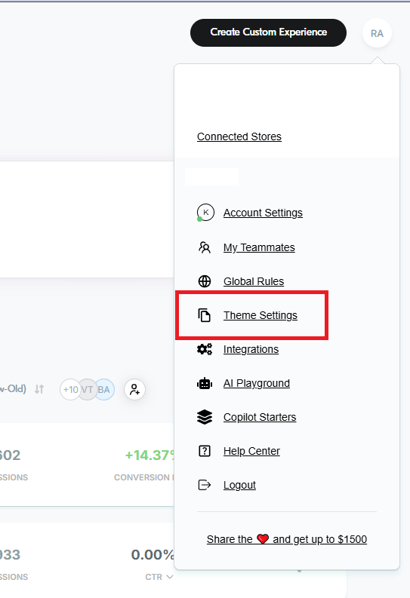
- Click your profile icon in the top-right corner of the Dashboard.
- Select Theme Settings.
- Locate your Shopify theme.
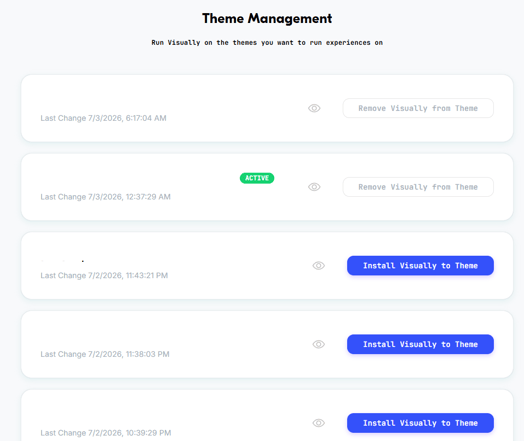
- Install or reinstall the SDK.
After reinstalling, verify that the <!--LOOMI SDK--> snippet still appears in your Shopify theme.
Still Having Issues?
If the SDK still isn't detected after verifying or reinstalling it, contact Support so we can help confirm the installation and troubleshoot further.
Email us at support@visually.io or reach out on chat for help with setup or troubleshooting.